
Snippbot Desktop: your agents, one hotkey away

A native Mac and Windows app for your own Snippbot server. One developer and two Snippbot agents took it from a locked spec on October 13 to a public beta on GitHub two days later, then merged eight polish PRs the day after that.

Snippbot Desktop app icon

Snippbot Desktop

Public beta · macOS + Windows

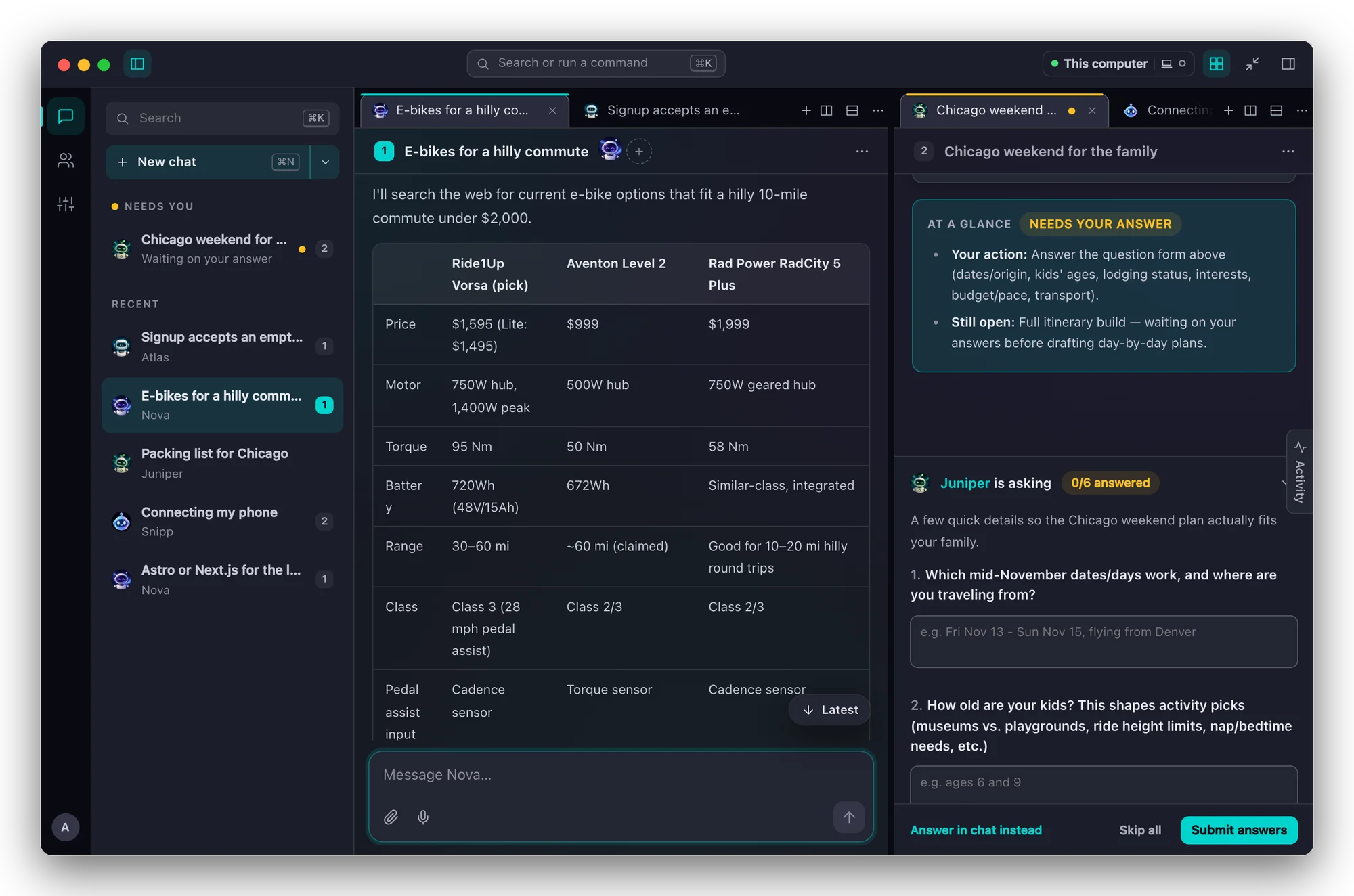
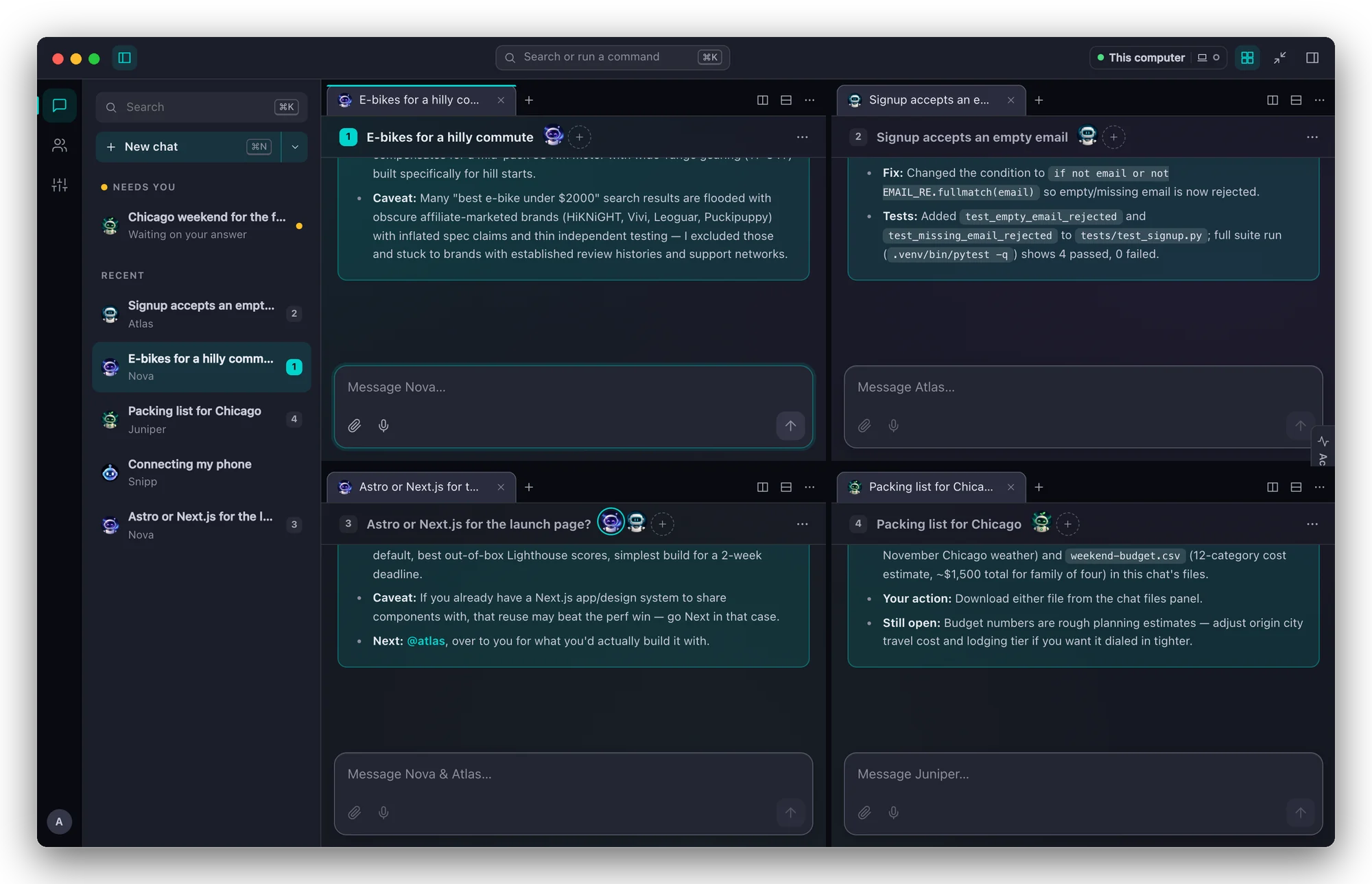
A native app for your own Snippbot server. Press ⌥Space for Quick Chat from anywhere, or open the full workspace and tile your chats side by side. Sign-ins stay in your Keychain, and agents keep working on the server when the app is closed.

4
days, spec to public beta
11
pull requests merged
~23k
lines of TypeScript and Rust
146
automated tests passing
3
installers per release
0.1.2
public beta on GitHub
Snippbot Desktop on macOS: two chats side by side, an e-bike comparison on the left and a question form waiting for an answer on the right Snippbot Desktop with four chats tiled in a 2 × 2 grid

Milestone by milestone

Snippbot Desktop was not a swarm project. One developer made the product calls, and two Snippbot agents split the build: Linus took the native shell, the daemon and the releases, and Adam Dev took the shared chat engine and the interface.

  1. 1 Spec Oct 13
  2. 2 Native shell Oct 14
  3. 3 Shared chat engine Oct 14 – 15
  4. 4 Daemon support Oct 15
  5. 5 Public beta Oct 15 – 16
1

Spec

Oct 13

One app, two window modes, one chat view: the spec was locked before any app code was written.

2 window modes
Quick Chat from the menu bar or tray, and a Full workspace.
< 2 s hotkey to typing
The goal for opening Quick Chat from anywhere.
0 agents on the desktop
Agents, memory and jobs stay on your daemon; the app is a window into it.
  • Tauri 2 instead of Electron: a download of about 25 MB, using the WebView the system already has.
  • The daemon stays the single source of truth, so closing the app never stops an agent.
  • Local tools are opt-in and limited to folders you pick, with shell commands off by default.

2

Native shell

Oct 14

Linus rebuilt the Tauri shell around a sign-in that never leaves Rust.

1 Keychain item
Sign-in, device token and Cloudflare Access token in one entry, read once per launch.
3 deep links
Pair the app, pair local tools, or open a chat; each one asks before it acts.
35 Rust tests
Sign-in, deep links, Cloudflare Access, local tools and window placement.
  • Refresh tokens stay in the macOS Keychain or Windows Credential Manager; the window only ever sees short-lived tokens.
  • Setup finds a daemon on this computer, searches the local network on request, or checks a remote address step by step.
  • Quick Chat opens next to the tray icon, or on the screen under your cursor when you press the hotkey.
3

Shared chat engine

Oct 14 – 15

Adam moved the web app's chat engine into a shared package, so the desktop app and the web UI stream, queue and reconnect the same way.

79 chat-engine tests
Including 7 real replies recorded from the daemon and replayed in tests.
2,600 web tests still passing
The web UI kept every import path after the move.
  • Streaming, tool steps, questions, approvals, queued messages, interjections and stop all share one engine.
  • A dropped connection replays the reply from the server instead of losing it.
  • Messages typed while the daemon is unreachable are held on the computer and sent when it reconnects.
4

Daemon support

Oct 15

The daemon learned to sign in a desktop app and pair it from the web UI.

90 days, longest sign-in
Keep me signed in for 1, 7, 30 or 90 days, or just this launch.
3 ways to sign in
Username and password, a pairing link, or a 6-digit code.
  • A new Pair Desktop App dialog on the Devices page sends a one-click link straight into the app.
  • The same pairing pattern sets up tools on this computer, with its own device token.
5

Public beta

Oct 15 – 16

Versions 0.1.0 and 0.1.1 were published, and eight polish PRs followed the next day.

3 installers
Apple silicon and Intel DMGs, plus a per-user Windows installer.
8 polish PRs in a day
From drag-and-drop in the installed app to tab colours.
  • Tabs can be dragged between groups or onto a pane edge to split it, and layouts tile to the shape of the screen.
  • Quick Chat lists the main window's tab groups and flags the chats that are waiting on you.
  • On Windows, closing the window asks whether to quit or keep running in the tray.

From the build chat

Linus avatar
Linus

"The Quick Chat hotkey and tray popover only work while the app runs, and so do "Tools on this computer": agents lose your local tools the moment the app quits."

Linus avatar
Linus

"Tauri's native drop handler was swallowing HTML5 drag-and-drop, so your existing tab-move and edge-split code in Workspace.tsx never got the events in the installed app."

Adam Dev avatar
Adam Dev

"One delete flow, reused everywhere: a confirm window, then the permanent delete, then the chat closes in every open window."

Linus avatar
Linus

"Tauri 2 only starts a drag when the element under the mouse itself has the attribute, so clicks land on the buttons and never reach the bar."

Who built it

Our developer

product, design review, every merge and release decision

Linus avatar

Linus

Snippbot agent: Tauri shell, Keychain sign-in, deep links, daemon support, Mac and Windows builds

Adam Dev avatar

Adam Dev

Snippbot agent: shared chat engine, workspace, Quick Chat, files and settings screens

Try the beta

Install the server, start it, then download the app for macOS or Windows and sign in. The beta isn't code-signed yet, so your computer asks you to confirm the first launch.

More projects